
Chiropractic Waiting Room Content in 2026: A Complete Comparison Guide
Finding the best content for your clinic's waiting room can be challenging. There are a few companies that offer content slides for chiropractic offices. The websites look similar, pricing is often unclear, and real comparisons are hard to find.
That’s why we made this guide.
We’ll walk through the four main options for chiropractic waiting room content: InNate Prints, ChiroSlides, ChiroTV Network, and ChiroMedia. We’ll compare what you pay, what you get, how easy setup is, and which one fits different types of practices.
To be clear, InNate Prints is our own product. We’ll be upfront about where our competitors do better, because if you choose them, you probably weren’t our ideal customer. We’d rather help you find the right fit than sell you something you’ll cancel soon.
Let’s dive in.
TLDR (for those who want a quick summary):
Here’s a quick summary before we go deeper:
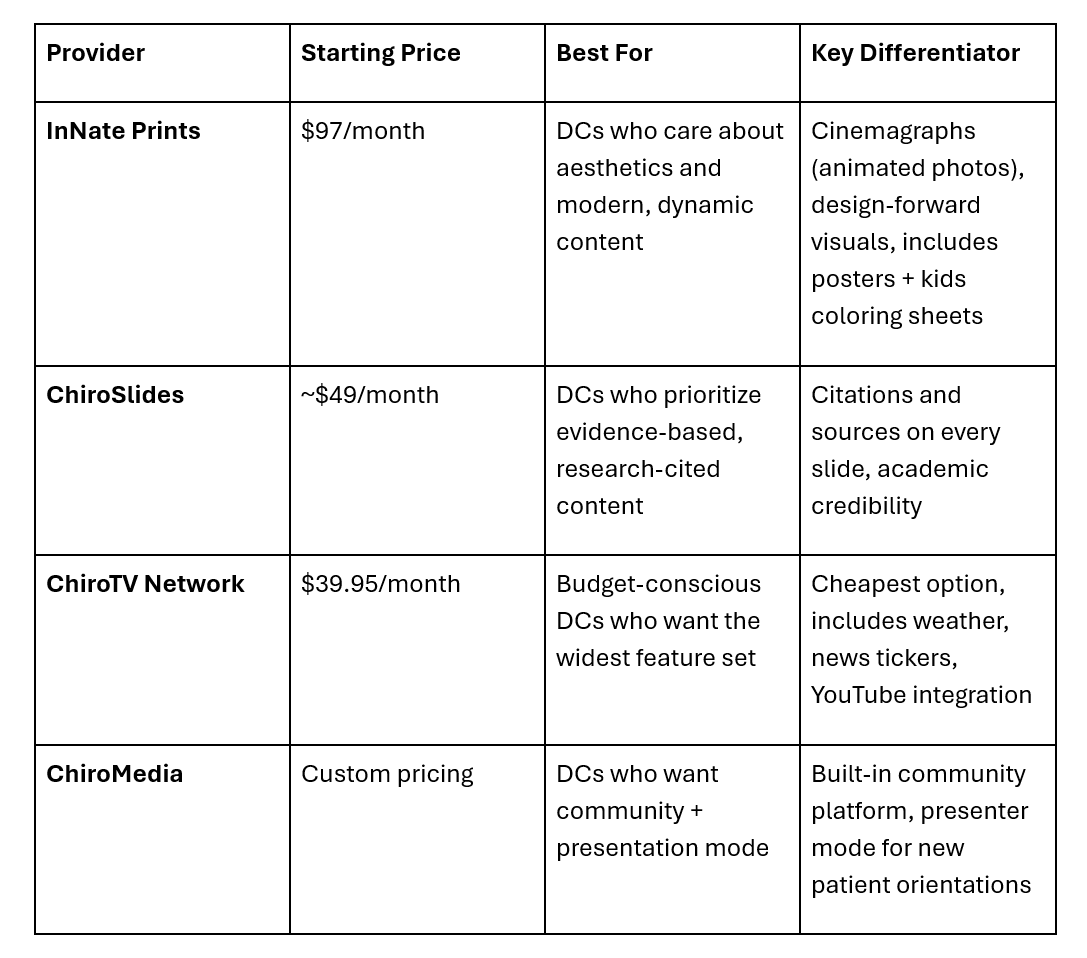
Now, let’s examine each option in depth.
What to look for when choosing a waiting room content provider:
Before we compare the four providers, it helps to know what you should really be looking for. Most DCs we talk to haven’t bought this kind of product before, and they often focus on the wrong things, usually price first, content second, and aesthetics third.
The hierarchy should be:
1. Will patients notice it? If your content looks like an old PowerPoint deck, most people will ignore it after 30 seconds. The main reason to have content on your screens is to make sure it gets seen.
2. Does it match the image you want for your practice? Your waiting room content is part of your brand. If it looks cheap, your practice will too. If it’s only full of research, you’ll seem more academic. If it looks great, your practice will feel more high-end.
3. How much time will it take each month? The whole point of a subscription is to save you effort. If a platform needs you to keep uploading, logging in, or picking content, you’ll probably stop using it after a few months.
4. What will it cost over three years? The monthly price isn’t as important as you might think. What really matters is whether you’ll still be subscribed after three years.
With these priorities in mind, let’s review the options.
InNate Prints: The Design-Forward Option
Starting price: $97/month for single screen (multi-screen discounts available)
Founded by: Dr. Jason Wiebe, practicing chiropractor for 24+ years
Based in: Canada (serves clinics across North America)
What you get:
- 22 new dynamic graphics every month (cinemagraphs - still photography with subtle motion, designed to grab attention and hold it)
- Unlimited access to an ever-expanding downloadable poster library
- 22 printable kids coloring sheets monthly
- All content is chiropractic-specific and philosophy-aligned
Where InNate Prints wins:
The look and feel are what set it apart. If you’ve seen most waiting room slideshow software, you know the usual: stock photos, clip-art layouts, and text-heavy slides that look like a school presentation. InNate Prints is different. Every graphic is made to catch the eye first and teach second.
The cinemagraph format really stands out. These aren’t fast moving videos or still images, they’re photos with one small moving part, like waves, steam, or hair in the wind. This makes patients stop and look at the screen, which is exactly the goal.
Setup is as simple as it gets: just a TV, an AppleTV, and an app. Content updates automatically every month. You never have to log in.
Where InNate Prints might not be your fit:
If you want data and citations on every slide, InNate isn’t for you. The content is meant to get patients thinking and feeling, not to give them research papers. DCs with a strong academic or evidence-based approach may want more citations than InNate offers.
If you want to add your own content, like announcements or staff photos, InNate doesn’t encourage that. Their approach is to keep your screens focused and curated. Some DCs find this limiting.
Who it's for:
This is for chiropractors who care about their clinic’s atmosphere. It’s a good fit for practices that want a premium, design-focused, or wellness-centered look. It also works well for DCs unhappy with their current TV content or new grads who want to start with great visuals.
ChiroSlides: The Evidence-Based Option
Starting price: Around $49/month (check their current site for specifics)
Differentiator: Every slide includes research citations and sources
What you get:
- A library of patient education slides covering chiropractic research, nutrition, fitness, spinal health, and wellness
- Content curated from healthcare journals and academic sources
- Sources cited directly on the slides so patients can see where claims come from
Where ChiroSlides wins:
Credibility with skeptical patients. If you practice in a market where patients arrive doubtful or have been told that chiropractic is "pseudoscience," having citations on the screen can quietly build trust. It signals to educated patients that your practice takes evidence seriously.
The price is lower than InNate’s. For a solo DC starting out, about $49 a month is easier to manage.
Where ChiroSlides might not be your fit:
The look is more practical than stylish. The slides clearly convey information, but they don’t stand out enough to grab patients’ attention. If your practice focuses on experience or atmosphere, you’ll notice the difference.
The content consists of static slides, not motion graphics. By 2026, this can feel outdated to many patients.
Who it's for:
This is best for evidence-based practices, especially in areas with highly educated or medical patients. It’s also good for DCs who often need to defend chiropractic with science and want their waiting room to help with that.
ChiroTV Network: The Budget Feature-Rich Option
Starting price: $39.95/month (one license covers all TVs in your office)
Differentiator: Most features for the lowest price
What you get:
- Patient education slides
- Live weather display
- Scrolling news tickers
- YouTube video integration
- QR code display for promotions
- Royalty-free background music
- Custom practice slides (your logo, your announcements)
Where ChiroTV Network wins:
The price is the main advantage. At $39.95 a month for all your TVs, it’s the most affordable choice. For clinics with several screens, the savings add up quickly.
It also offers a wide range of features. If you want to show the weather, run a news ticker, and add your own announcements with educational content, ChiroTV Network handles it all. Some DCs really like this flexibility.
Where ChiroTV Network might not be your fit:
The look can feel cluttered. With weather, news, tickers, and slides all on one screen, it can start to feel like an airport terminal, informative, but not relaxing or professional. Some patients ignore it right away.
Philosophy-aligned DCs often find the news integration actively counterproductive. If your waiting room is supposed to be a decompression space, a ticker of current events is the opposite of that.
Who it's for:
This is a good fit for budget-focused practices, especially those with several locations where costs add up. It’s also for DCs who want their TVs to do more than just patient education, such as sharing announcements or weather updates.
ChiroMedia: The Community-Driven Option
Starting price: Custom (varies by clinic needs)
Differentiator: Built-in community platform plus presenter mode for doctors' reports
What you get:
- Curated patient education content
- A presenter mode that lets you run new patient orientations directly from the platform
- Access to an online community of other ChiroMedia-subscribing DCs
- On-demand videos, interviews, and training from other chiropractors
- Content designed to work with Amazon Fire TV Stick
Where ChiroMedia wins:
The presenter mode is genuinely useful; being able to pull up a structured new patient report of findings directly on your waiting room TV (or switch modes to use it in your consultation room) is a feature no one else in the category offers.
The community aspect matters more than you'd think. ChiroMedia subscribers get access to a private space where other DCs share best practices, and for newer chiropractors, that peer network can be worth the subscription by itself.
Where ChiroMedia might not be your fit:
The pricing isn’t clear, which some DCs don’t like. If you want to know the cost before talking to someone, ChiroMedia makes that harder than the other options.
The platform offers a lot at once: content, presenter mode, and community. Some DCs find they use only one feature and ignore the others, so they end up paying for things they don’t use.
Who it's for:
This is for DCs who want a strong community and more than just content. It’s also good for practices that run formal new-patient orientations and need a platform to support them.
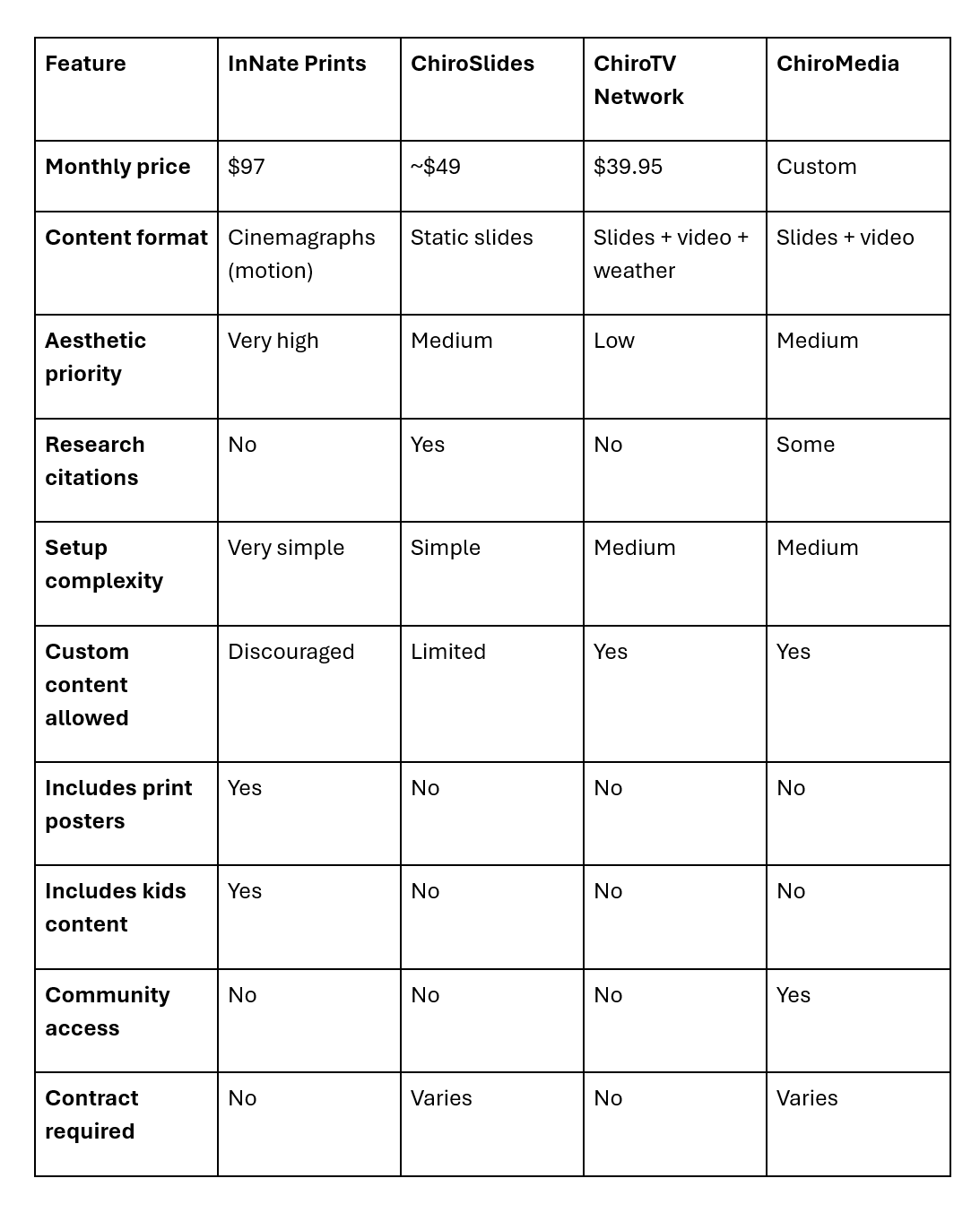
A quick comparison matrix:
Here’s how these four options compare on top concerns:
How to make the decision:
Here's the straightforward decision process we’d use if we were starting from zero:
Choose InNate Prints if: Aesthetic matters to your brand. You want the simplest possible setup. You value premium design over breadth of features. You want posters and kids' content included.
Choose ChiroSlides if: You need citations to build trust with skeptical or academic patients. You're budget-conscious and willing to sacrifice visual polish for credibility.
Choose ChiroTV Network if: You want the lowest cost and the broadest feature set. You want to display weather, news, and announcements alongside educational content.
Choose ChiroMedia if: You want the built-in community, and you'll actually use the presenter mode for new patient orientations.
The question nobody asks but should:
Which of these will you still be subscribed to in three years?
This is the question that really matters. Most chiropractic waiting room content subscription services see a high rate of cancellations in the first year. DCs sign up, use it for a few months, lose interest, and then cancel.
The subscriptions that survive long-term are the ones that genuinely remove work from the DC's plate and that the DC feels proud of when patients see them. If the content embarrasses you, you'll cancel. If it requires too much effort to maintain, you'll cancel. If it looks like everyone else's waiting room, you'll start wondering if it's worth the money.
Whatever you choose, ask yourself: in six months, when patients mention your screens, will you feel good about what’s showing? That’s what matters most.
Ready to see what InNate Prints looks like in practice?
If the design-focused option seems right for your clinic, you can check out the full graphics library and start your subscription on our site. It’s $97 a month, with no contracts, and you can cancel anytime.
See our Graphics →
Still deciding? Email us at connect@innateprints.com. We’ll honestly let you know if we’re the right fit or suggest a competitor if they suit you better.