
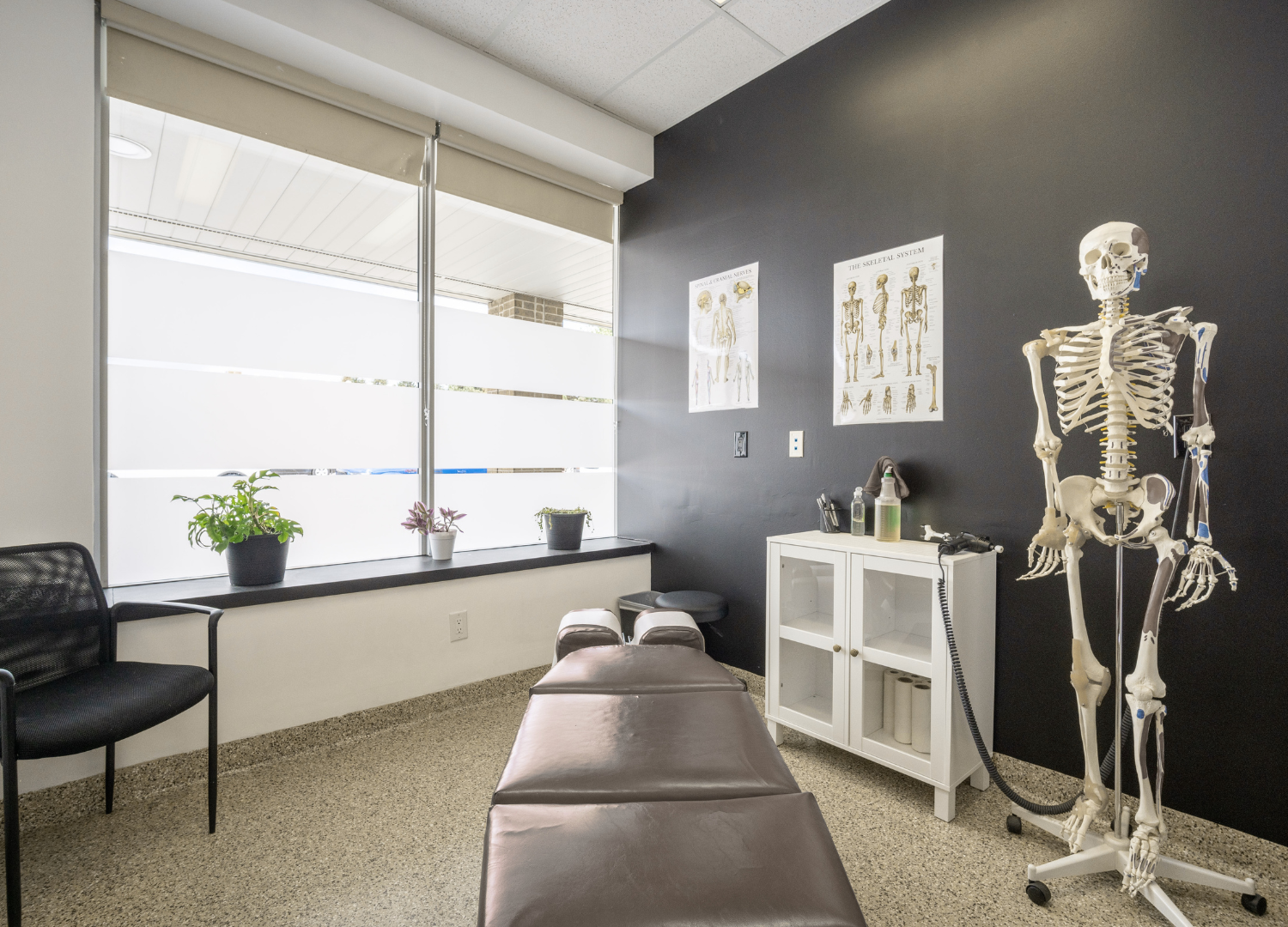
The New Chiropractor's Guide to Opening Your First Practice (And 7 Things Nobody Tells You Until It's Too Late)
Most resources for new DCs are either generic business advice or thinly veiled sales pitches. This guide covers what actually matters in your first 12 months, including the mistakes most new chiropractors make before they even see their first patient.
If you’re a newly licensed chiropractor or just a few months from graduating, this post is for you.
Most resources for new DCs fall into two categories: generic business advice that could apply to any startup, or sales pitches from practice management software companies. Neither is very helpful when you’re reviewing a lease agreement and trying to decide whether to sign.
This guide aims to be genuinely useful. We’ll cover what really matters in your first 12 months, what you can safely skip, and the things nobody tells new DCs until after they’ve made mistakes.
Let’s get started.
Part One: Before You Sign Anything
The choices you make in your first 60 days of building your practice matter more than you might think. They set the stage for everything that follows. Many new DCs rush through this part because they’re eager to see patients, but that’s a mistake.
1. Location matters more than you think, and not for the reasons you might expect
Every new DC hears the same advice about location: look for high foot traffic, good parking, and visible signage. That’s fine, but it’s not the most important advice.
If your office is next to a CrossFit gym, a barre studio, or a yoga studio, you’ve chosen a location where people already care about their health. If you’re in a medical plaza next to a pain clinic, your patients are likely to be in acute distress. If your office is in a strip mall next to a nail salon and a discount furniture store, you haven’t pre-selected any group, so you’ll need to build your patient base from scratch through marketing.
Neither option is wrong, but they lead to very different types of practices. A wellness-focused location will bring in patients who are interested in maintenance care. A medical plaza will attract more acute pain cases. Make your choice on purpose.
Also, the cheapest lease is rarely the best deal. Saving $800 a month on rent in a low-traffic area can end up costing you $3,000 a month in marketing to get the same number of new patients. Do the math before you sign.
2. Negotiate your lease, even if it feels uncomfortable
Landlords expect you to negotiate. Many new DCs sign the first lease they’re offered because they don’t want to seem difficult or risk losing the space. This mistake can cost you thousands of dollars over the life of your lease.
Specific things to negotiate:
Rent abatement for build-out. If you're building out a raw space, you should get 2-4 months of free rent during construction. This is standard.
Tenant improvement allowance. Many landlords will contribute $10-$50/sq ft toward your build-out costs. Ask for this in writing.
Escalation caps. Annual rent increases are usually tied to CPI or a fixed percentage. Cap the annual increase at 2-3%.
Personal guarantee limits. If the landlord requires a personal guarantee, negotiate a limit of 12 months of rent rather than the full lease term.
Exit clauses. Build in the ability to exit the lease if you meet certain conditions (death, disability, sale of practice).
Have a commercial real estate attorney review your lease before you sign. The $500 to $1,500 you spend on legal review will be some of the best money you spend in your first year.
Part Two: Equipment and Setup
Once you’ve signed your lease, figuring out equipment becomes urgent. Many new DCs spend far too much at this stage.
3. Buy less than you think you need in year one
Every equipment vendor will try to sell you a fully outfitted clinic with four adjusting tables, two therapy rooms equipped with a full range of modalities, an X-ray suite, and more. Resist the urge to buy everything at once.
What you actually need to see your first 200 patients:
1-2 adjusting tables (one if you're solo; two if you want flexibility)
Front desk setup (reception desk, two chairs, computer with EHR access, phone system)
Basic exam equipment (the stuff you already bought in school)
Waiting room furniture (enough seating for 4-6 people comfortably)
One TV for your waiting room (more on this in a moment)
Practice management software (we'll get to this)
Your state or provinces required documentation and signage
That’s all you need. You don’t need an X-ray suite in your first year; you can refer patients out for imaging. If you’re working alone, you don’t need a second adjusting area.
New DCs who spend $80,000 on equipment before seeing their first patient often end up with debt that affects every business decision for years. Those who open with $15,000 to $25,000 in equipment have more breathing room.
4. Your EHR/Practice Management Software choice matters more than the tables you buy
The single most-used piece of equipment in your practice will be your practice management software. You'll interact with it hundreds of times a week. Your front desk will live inside it. Your billing will flow through it. Your patient communication will depend on it.
Most new DCs pick their EHR based on whichever vendor has the best sales pitch at the chiropractic conference they attended. This is backward. Pick based on:
Does it handle insurance billing cleanly in your area? Billing is where most practices lose money through software bottlenecks. If your EHR makes it hard to submit clean claims, you'll lose tens of thousands of dollars in write-offs over the years.
Is the front desk workflow fast? Your front desk will check in 20-40 patients a day. If each check-in takes 30 seconds longer than it needs to, that's 20 minutes of lost productivity every day.
Does it include patient communication? Appointment reminders, missed-appointment follow-up, and recall sequences matter enormously for retention. Don't buy software that doesn't automate these.
Can you get out? Some EHRs make it nearly impossible to export your patient data if you want to switch. Ask this question directly before signing a contract.
The main options in 2026 are ChiroTouch, ChiroSpring, ChiroFusion, zHealth, and Genesis. Each has its strengths. Don’t just take a salesperson’s word for it. Ask for trial access and try running a mock week of patient flow through each one.
Part Three: The Stuff Nobody Warns You About
Now let’s talk about the parts of practice ownership that are harder to describe. Most resources skip this section.
You just spent four years in chiropractic school surrounded by 200 classmates who all understood exactly what you were doing. You had study groups, clinic partners, teachers who would answer questions, and peers who were going through the same thing.
Now you're alone in an office you're paying for. You're Googling billing codes at 10pm. You're deciding whether to hire a front desk person yourself. You're wondering why your new patient numbers are slow and whether it's you, the market, or the economy.
This isolation is a bigger factor in first-year practice failure than most people acknowledge. It warps decision-making. It leads to burnout. It makes you cling to every patient who walks in the door, which, ironically, makes retention worse because patients can feel your desperation.
Two practical countermeasures:
Find a peer group of other new DCs. This can be an informal text thread of classmates, a formal mastermind group, or a paid community. What matters most is that you have people to talk to who are going through the same thing.
Find a mentor who is five to ten years ahead of you. This doesn’t have to be a paid business coach, just someone whose practice you respect and who is willing to answer your questions from time to time. Most experienced DCs are happy to help if you ask respectfully.
6. Marketing matters from day one, but not the way you think
New DCs are often told to spend a lot on marketing in their first year. This is usually bad advice. Paying for ads before your internal systems are working is just a waste of money. You’ll convert fewer patients, lose more, and end up thinking that marketing doesn’t work for you.
What actually works in year one, in rough order of ROI:
Your Google Business Profile. Fully optimized, with accurate hours, high-quality photos, and active review management. This alone will drive more new patients than most paid marketing in the first 12 months. Set aside a full afternoon to do this right.
Active review generation. Ask every satisfied patient to leave a Google review in person at their second or third visit. Don’t use automated systems for this in your first year; asking personally works three to five times better.
Local partnerships. Build relationships with the yoga studio, the CrossFit gym, the pediatric dentist, and the massage therapist down the street. Mutual referral relationships are almost free, and they scale slowly but powerfully.
Your waiting room is a referral engine. Every patient who walks through your door is a potential source of 2-5 future referrals. The waiting room experience (and the adjustment experience itself) is where that referral behavior gets built or lost. We'll come back to this.
Paid advertising should come only after everything above is working. Once your Google Business Profile is optimized, you have over 30 reviews, and your internal conversion is strong, then paid ads make sense. Not before.
7. Your waiting room is a business decision, not just about decoration
Let’s talk about this directly, because it’s something most new DCs get wrong and it’s an area where we have real expertise.
When you're setting up your first office, there's a strong temptation to treat the waiting room as décor. You pick furniture you think looks nice, put up a few anatomical posters from chiropractic school, hang a diploma, and call it done.
This is a mistake.
Your waiting room is where patients form their first and strongest impressions of your practice. They sit there for 10 to 20 minutes before each adjustment, deciding if you run a serious, premium, relaxed, or chaotic practice. It’s also where they decide whether to refer their spouse, kids, and friends, or keep your practice to themselves.
Three specific decisions about your waiting room that will pay off for years:
1. Invest in a screen from the start. A 55-inch or larger TV on your waiting room wall is one of the best investments you can make. It grabs attention, helps with patient understanding of chiropractic, and signals a premium practice. Whether you use a content subscription like InNate Prints or create your own content, the screen itself is worth the $500 to $1,000.
2. Don’t hang the standard posters. Every chiropractic vendor sells the same dozen posters, and most patients have seen them before. They make your clinic look generic. Instead, invest in custom-printed posters that show your practice’s personality, or use a few high-quality framed photos.
3. Lighting is more important than you might think. Fluorescent overhead lights can make patients feel stressed. Add lamps, use natural light, or choose warmer LED lighting. It’s inexpensive and makes a big difference in how your space feels.
Your waiting room is the easiest place in your practice to stand out from the competition. Most DCs get it wrong by default. If you get it right, it will quietly lead to more referrals, better retention, and a stronger reputation for your practice over time.
Part Four: A Rough Year-One Timeline
If it's helpful, here's the rough sequence most new DCs should follow:
Months 1-2 (before you open):
Sign lease
Apply for all licenses and credentialing.
Order equipment (keep it minimal)
Set up EHR and practice management.
Build a website and Google Business Profile.
Design waiting room and clinical spaces
Months 3-4 (opening and early days):
Soft open to friends, family, and network
Focus entirely on internal systems and patient experience.
Ask every happy patient for reviews.
Start building local partnerships.
Don't run paid ads yet.
Months 5-8 (building momentum):
Begin measuring retention and new patient numbers weekly.
Start a small paid ad budget only if your internal conversion is strong.
Expand hours if demand warrants it.
Consider hiring a part-time front desk person.
Months 9-12 (stabilizing):
Review financials honestly
Adjust pricing if needed (most new DCs underprice)
Add modalities or services only if there is patient demand.
Plan year two: hire, expand, or optimize?
The One Thing Every New DC Should Hear:
Building a practice is a marathon, not a sprint. The DCs who are successful after ten years are rarely the ones who had the best first year. They’re the ones who had a solid start and kept improving a little each quarter for years.
Don’t compare yourself to the Instagram practitioner who claims to have 40 new patients a week. That person might be exaggerating, could be years ahead of you, or may be burning out behind the scenes. A healthy practice that grows steadily year over year is often more profitable, sustainable, and better for your life.
Build for the long game. Take care of the patients you have before chasing more. Make your waiting room, and every other touchpoint, genuinely reflect the kind of practice you want to be known for.
That's the work. Everything else follows.
InNate Prints creates premium waiting room content designed specifically for chiropractic clinics. If you're setting up your first office and want to start with beautiful, professionally designed visual content from day one, we'd love to help.
Want more resources for new DCs? Reach out at connect@innateprints.com, we're always happy to answer questions from the next generation of chiropractors.

What Actually Happens in Your Patient's Brain During the 8 Minutes They Spend in Your Waiting Room
The average patient spends 8 to 20 minutes in your waiting room before their adjustment. Most chiropractors treat that time as neutral. The research says otherwise, and what you put on your screens during that window matters more than you might think.
The average patient spends somewhere between 8 and 20 minutes in a chiropractic waiting room before their adjustment.
In most clinics, those minutes are seen as wasted time. Patients sit down, check their phones, scroll through Instagram, maybe sign in on an iPad, and wait to be called back. The waiting room is often just a hallway, a neutral space between arriving and being seen.
But decades of research in environmental psychology, neuroscience, and healthcare design show something different. Those minutes are not neutral. They shape how open your patient will be to the care they are about to get.
This post explains what is really happening in your patient's brain during that time, and why the look and feel of your waiting room matters more than most chiropractors realize.
The research nobody is applying to chiropractic:
In 1984, a healthcare researcher named Roger Ulrich published a study in Science that quietly changed how hospitals were designed for the next forty years.
Ulrich looked at patient recovery records from a Pennsylvania hospital between 1972 and 1981, comparing two groups of surgical patients. Both groups had just undergone the same procedure (gallbladder removal). Both groups were assigned to similar rooms. The only meaningful difference: one group's window looked out at trees; the other's looked at a brick wall.
The patients with the tree view recovered faster. They had shorter hospital stays. They required fewer strong painkillers. They received fewer negative evaluative notes from their nurses.
Same surgery. Same care. Different visual environment. Measurably different outcomes.
Ulrich's study became one of the most-cited papers in healthcare design research and is considered a foundational contribution to what is now known as evidence-based healthcare design. It helped influence a broader shift toward incorporating natural light, views, and calming environments into healthcare settings.
Almost no chiropractic practice has internalized what it means.
Why vision matters before a medical interaction:
Here's the part that most people skim past when they hear about Ulrich's research: the mechanism.
Why did patients recover faster with a view of trees? The answer isn't that trees have healing properties. It's that stress actively suppresses the body's capacity to heal. Elevated stress levels are associated with slower recovery processes, changes in immune function, and increased perception of pain. When a patient's environment keeps their nervous system in a low-grade fight-or-flight state, their body has fewer resources available for recovery.
Research suggests that visual environments can play a meaningful role in influencing stress responses. What we see does more than inform us; it also affects our nervous system right away. Sharp edges, crowded spaces, harsh lighting, and clutter can make the body more alert and tense. Softer images, natural scenes, organized spaces, and gentle lighting help the body relax and enter the 'rest and heal' state.
This matters enormously for chiropractic care specifically.
The main idea behind an adjustment is that the nervous system drives healing. When the sympathetic system is in charge, the body goes into defense mode: muscles tense, breathing is shallow and focus narrows. When the parasympathetic system takes over, the body relaxes: muscles loosen, breathing deepens, and attention widens.
Many chiropractors observe that patients who are more relaxed tend to respond differently during adjustments than those who arrive tense or guarded. Chiropractors notice this every day. Some patients come in already relaxed and the adjustment flows smoothly. Others arrive tense, and their bodies resist every step.
Your waiting room is the last 10 to 20 minutes of pre-adjustment preparation. It's either working for the adjustment or working against it.
The attention economy problem:
There's a second, more modern dimension to this, and it's worth addressing directly because it's shifted the stakes dramatically in the past ten years.
Many people now spend a significant portion of their day on their phones. Social media feeds are designed by experts to grab and hold your attention. Modern social media platforms are built around short, fast-moving content designed to continuously capture attention. In the last five years, our brains have gotten used to constant novelty, endless stimulation, and frequent bursts of dopamine.
This has a real consequence for healthcare settings: patients who sit in a silent waiting room with nothing visual happening often feel the urge to reach for their phones. Their hand goes to their phone automatically. They don't do this because they're rude. They do it because their attention has become accustomed to constant input.
This is the main issue with the 'calming, minimalist waiting room' that many wellness practices use. In theory, a quiet space with soft music and neutral walls should help people relax. It often sends patients straight to their phones, which is the last thing you want before their adjustment.
Some research suggests that highly stimulating, fast-paced content can make it harder for the brain to fully settle immediately afterward. Rapid-fire content consumption leaves the nervous system primed for more input, not for release. A patient who scrolls for 10 minutes in your waiting room is often more activated when they're called back than when they sat down.
So the question becomes: what do you put in front of patients' eyes during that window?
What the environmental psychology research suggests:
Three findings from healthcare design research are particularly relevant to waiting room content:
1. Natural imagery reduces physiological stress markers. Research building on Ulrich’s work suggests that exposure to natural scenes, including images and video, can support stress reduction and improve subjective emotional states. The body responds to the representational nature, not just to the real nature. This is why aquariums became such a common feature in dental waiting rooms during the 1980s and 90s. Early behavioral research suggested they reduced patient anxiety before procedures.
2. Visual motion tends to draw attention more effectively than static imagery. Our eyes are naturally drawn to movement as a survival instinct. Even a small amount of motion in an image can more effectively pull someone's gaze away from their phone than a static poster. This is why cinemagraphs, photos with subtle animated parts, are now popular in visual communication. They offer the calm look of a photo with the added draw of movement.
3. Meaningful content works better than decorative content. Content that feels relevant and meaningful to the viewer is more likely to capture and hold attention than purely decorative imagery. For example, a photo of a spine with a helpful caption about posture has a different effect than a generic mountain photo. The brain notices intent, and that leads to more engagement.
Taken together, these findings suggest something specific about what waiting room content should do:
It should draw attention away from phones. It should help calm the nervous system. It should also be relevant to why the patient is in your clinic, supporting their visit instead of distracting from it.
Almost no chiropractic waiting room content on the market is designed with these principles in mind. Most defaults to one of two extremes: clinical, text-heavy educational slides that patients ignore, or generic stock imagery that has nothing to do with the care they're about to receive.
What this means for your clinic:
Let's bring this back down to practical terms.
If the research on environmental psychology and healthcare design is right, and decades of studies say it is, then the look of your waiting room is doing one of three things every day:
Option A: Outdated posters, fluorescent lighting, clutter, and a silent TV playing cable news are actively priming your patients for a less effective adjustment. They're arriving at your table already activated, already guarded, already defensive.
Option B: A minimalist waiting room with no visual engagement isn't hurting your patients, but it's not helping either. They'll fill the silence with their phones, which activates the nervous system in other ways.
Option C: Intentionally designed visual content that pulls attention away from phones, settles the nervous system, and reinforces the meaning of chiropractic care is preparing your patients to receive their adjustment more fully.
Most chiropractors have never thought of their waiting room as part of the clinical process. It's usually seen as décor, branding, or customer experience. While those are true, they miss the bigger point.
Your waiting room is where the adjustment begins.
The patient's nervous system starts deciding how open they are the moment they sit down. Their guard goes up or down based on what they see, hear, and feel. By the time they are called back, their body is already either open or closed to what you are about to do.
You can't adjust a closed nervous system. Not really. You can do the mechanical work, but the healing response is blunted.
A small reframe:
Here's the mental shift we think is worth making:
Stop thinking about your waiting room as a room where patients wait. Start thinking about it
as the first clinical space they enter.
If your adjusting room is where the hands-on work happens, your waiting room is where the preparation takes place. Everything in the waiting room is part of the care. The images on the walls, the TV screens, the lighting, and the magazines on the table all play a role, whether you planned it or not.
Practices that intentionally design their environments often report improvements in patient experience, engagement, and overall perception of care. Not because the waiting room content is magic, but because patients who feel genuinely prepared for their adjustment have a better experience, which translates into every downstream metric a practice cares about.
The practical question:
If you're reading this and thinking, "Okay, my waiting room is probably not doing what I want it to do," you're not alone. Most clinics haven't been designed for this because nobody in chiropractic school teaches this.
The practical question becomes: what's the highest leverage change you can make?
For most clinics, the screen is key. The TV in your waiting room is already there, whether it's turned off, showing the news, or running old slides. It's the one part of your waiting room that can capture the most attention, but it's often overlooked.
Switching what you show on that screen to content that calms the nervous system, draws attention away from phones, and highlights the value of chiropractic care is the simplest upgrade most clinics can make. You don't need to renovate, buy new furniture, or redesign the space. You just need better content.
That's the thesis behind InNate Prints, and behind every good waiting room content system in the category. What's on the screen matters more than most chiropractors realize.
Whether you choose our platform or a competitor's, the deeper point holds: your waiting room is not a neutral space. It's either preparing your patients for care, or it's fighting you. It’s worth taking a few minutes to figure out which one is true in your practice.
Sources and further reading:
Ulrich, R. S. (1984). "View through a window may influence recovery from surgery." Science, 224(4647), 420-421.
Ulrich, R. S. (1991). "Stress recovery during exposure to natural and urban environments." Journal of Environmental Psychology, 11(3), 201-230.
The Center for Health Design — research repository on evidence-based healthcare design: healthdesign.org
Ulrich, R. S., Zimring, C., et al. (2008). "A review of the research literature on evidence-based healthcare design." HERD: Health Environments Research & Design Journal, 1(3), 61-125.
Want to see how we've applied these principles in our waiting room content? Explore the InNate Prints graphics library or start your subscription at $97/month.
See our Graphics →

Chiropractic Waiting Room Content in 2026: A Complete Comparison Guide
There are a handful of companies offering waiting room content for chiropractic clinics. The websites look similar, pricing is often unclear, and real comparisons are hard to find. This guide breaks it all down honestly, including where our competitors do better than us.
Finding the best content for your clinic's waiting room can be challenging. There are a few companies that offer content slides for chiropractic offices. The websites look similar, pricing is often unclear, and real comparisons are hard to find.
That’s why we made this guide.
We’ll walk through the four main options for chiropractic waiting room content: InNate Prints, ChiroSlides, ChiroTV Network, and ChiroMedia. We’ll compare what you pay, what you get, how easy setup is, and which one fits different types of practices.
To be clear, InNate Prints is our own product. We’ll be upfront about where our competitors do better, because if you choose them, you probably weren’t our ideal customer. We’d rather help you find the right fit than sell you something you’ll cancel soon.
Let’s dive in.
TLDR (for those who want a quick summary):
Here’s a quick summary before we go deeper:
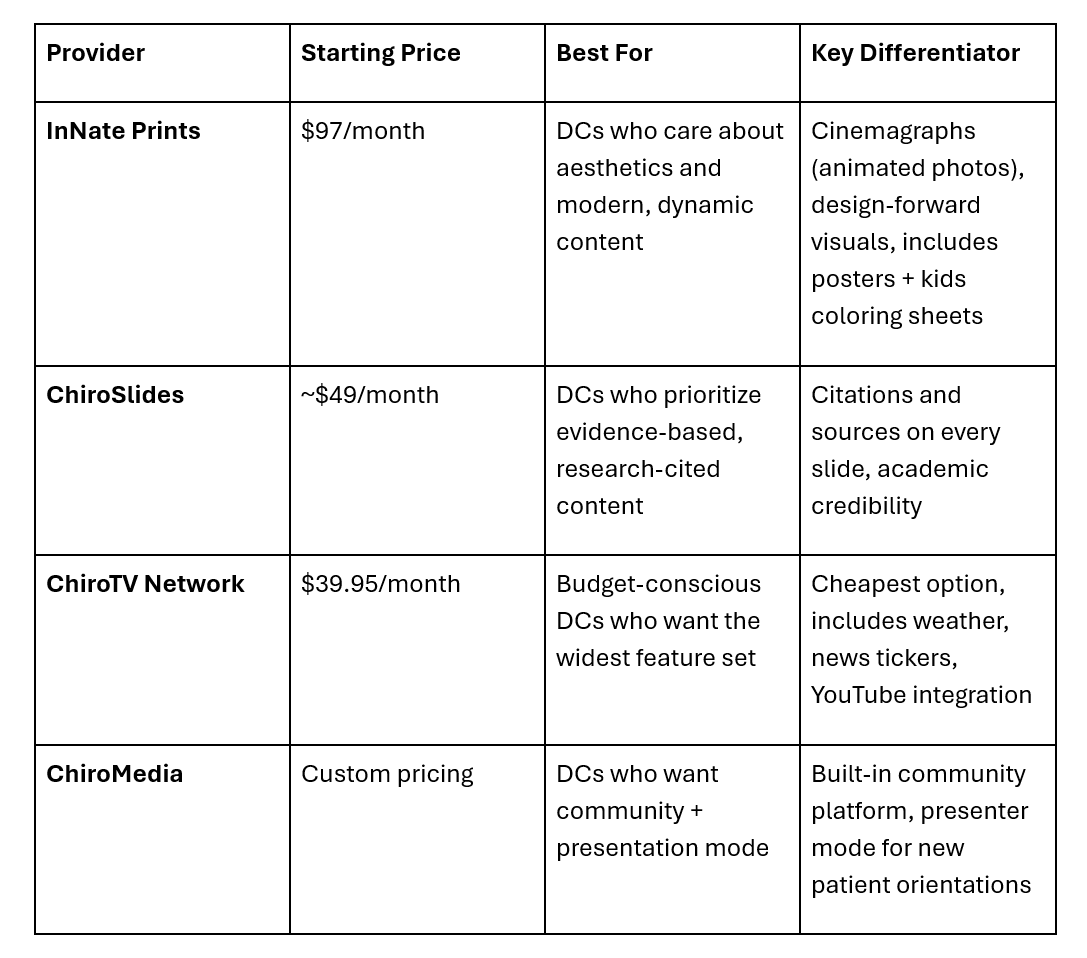
Now, let’s examine each option in depth.
What to look for when choosing a waiting room content provider:
Before we compare the four providers, it helps to know what you should really be looking for. Most DCs we talk to haven’t bought this kind of product before, and they often focus on the wrong things, usually price first, content second, and aesthetics third.
The hierarchy should be:
1. Will patients notice it? If your content looks like an old PowerPoint deck, most people will ignore it after 30 seconds. The main reason to have content on your screens is to make sure it gets seen.
2. Does it match the image you want for your practice? Your waiting room content is part of your brand. If it looks cheap, your practice will too. If it’s only full of research, you’ll seem more academic. If it looks great, your practice will feel more high-end.
3. How much time will it take each month? The whole point of a subscription is to save you effort. If a platform needs you to keep uploading, logging in, or picking content, you’ll probably stop using it after a few months.
4. What will it cost over three years? The monthly price isn’t as important as you might think. What really matters is whether you’ll still be subscribed after three years.
With these priorities in mind, let’s review the options.
InNate Prints: The Design-Forward Option
Starting price: $97/month for single screen (multi-screen discounts available)
Founded by: Dr. Jason Wiebe, practicing chiropractor for 24+ years
Based in: Canada (serves clinics across North America)
What you get:
- 22 new dynamic graphics every month (cinemagraphs - still photography with subtle motion, designed to grab attention and hold it)
- Unlimited access to an ever-expanding downloadable poster library
- 22 printable kids coloring sheets monthly
- All content is chiropractic-specific and philosophy-aligned
Where InNate Prints wins:
The look and feel are what set it apart. If you’ve seen most waiting room slideshow software, you know the usual: stock photos, clip-art layouts, and text-heavy slides that look like a school presentation. InNate Prints is different. Every graphic is made to catch the eye first and teach second.
The cinemagraph format really stands out. These aren’t fast moving videos or still images, they’re photos with one small moving part, like waves, steam, or hair in the wind. This makes patients stop and look at the screen, which is exactly the goal.
Setup is as simple as it gets: just a TV, an AppleTV, and an app. Content updates automatically every month. You never have to log in.
Where InNate Prints might not be your fit:
If you want data and citations on every slide, InNate isn’t for you. The content is meant to get patients thinking and feeling, not to give them research papers. DCs with a strong academic or evidence-based approach may want more citations than InNate offers.
If you want to add your own content, like announcements or staff photos, InNate doesn’t encourage that. Their approach is to keep your screens focused and curated. Some DCs find this limiting.
Who it's for:
This is for chiropractors who care about their clinic’s atmosphere. It’s a good fit for practices that want a premium, design-focused, or wellness-centered look. It also works well for DCs unhappy with their current TV content or new grads who want to start with great visuals.
ChiroSlides: The Evidence-Based Option
Starting price: Around $49/month (check their current site for specifics)
Differentiator: Every slide includes research citations and sources
What you get:
- A library of patient education slides covering chiropractic research, nutrition, fitness, spinal health, and wellness
- Content curated from healthcare journals and academic sources
- Sources cited directly on the slides so patients can see where claims come from
Where ChiroSlides wins:
Credibility with skeptical patients. If you practice in a market where patients arrive doubtful or have been told that chiropractic is "pseudoscience," having citations on the screen can quietly build trust. It signals to educated patients that your practice takes evidence seriously.
The price is lower than InNate’s. For a solo DC starting out, about $49 a month is easier to manage.
Where ChiroSlides might not be your fit:
The look is more practical than stylish. The slides clearly convey information, but they don’t stand out enough to grab patients’ attention. If your practice focuses on experience or atmosphere, you’ll notice the difference.
The content consists of static slides, not motion graphics. By 2026, this can feel outdated to many patients.
Who it's for:
This is best for evidence-based practices, especially in areas with highly educated or medical patients. It’s also good for DCs who often need to defend chiropractic with science and want their waiting room to help with that.
ChiroTV Network: The Budget Feature-Rich Option
Starting price: $39.95/month (one license covers all TVs in your office)
Differentiator: Most features for the lowest price
What you get:
- Patient education slides
- Live weather display
- Scrolling news tickers
- YouTube video integration
- QR code display for promotions
- Royalty-free background music
- Custom practice slides (your logo, your announcements)
Where ChiroTV Network wins:
The price is the main advantage. At $39.95 a month for all your TVs, it’s the most affordable choice. For clinics with several screens, the savings add up quickly.
It also offers a wide range of features. If you want to show the weather, run a news ticker, and add your own announcements with educational content, ChiroTV Network handles it all. Some DCs really like this flexibility.
Where ChiroTV Network might not be your fit:
The look can feel cluttered. With weather, news, tickers, and slides all on one screen, it can start to feel like an airport terminal, informative, but not relaxing or professional. Some patients ignore it right away.
Philosophy-aligned DCs often find the news integration actively counterproductive. If your waiting room is supposed to be a decompression space, a ticker of current events is the opposite of that.
Who it's for:
This is a good fit for budget-focused practices, especially those with several locations where costs add up. It’s also for DCs who want their TVs to do more than just patient education, such as sharing announcements or weather updates.
ChiroMedia: The Community-Driven Option
Starting price: Custom (varies by clinic needs)
Differentiator: Built-in community platform plus presenter mode for doctors' reports
What you get:
- Curated patient education content
- A presenter mode that lets you run new patient orientations directly from the platform
- Access to an online community of other ChiroMedia-subscribing DCs
- On-demand videos, interviews, and training from other chiropractors
- Content designed to work with Amazon Fire TV Stick
Where ChiroMedia wins:
The presenter mode is genuinely useful; being able to pull up a structured new patient report of findings directly on your waiting room TV (or switch modes to use it in your consultation room) is a feature no one else in the category offers.
The community aspect matters more than you'd think. ChiroMedia subscribers get access to a private space where other DCs share best practices, and for newer chiropractors, that peer network can be worth the subscription by itself.
Where ChiroMedia might not be your fit:
The pricing isn’t clear, which some DCs don’t like. If you want to know the cost before talking to someone, ChiroMedia makes that harder than the other options.
The platform offers a lot at once: content, presenter mode, and community. Some DCs find they use only one feature and ignore the others, so they end up paying for things they don’t use.
Who it's for:
This is for DCs who want a strong community and more than just content. It’s also good for practices that run formal new-patient orientations and need a platform to support them.
A quick comparison matrix:
Here’s how these four options compare on top concerns:
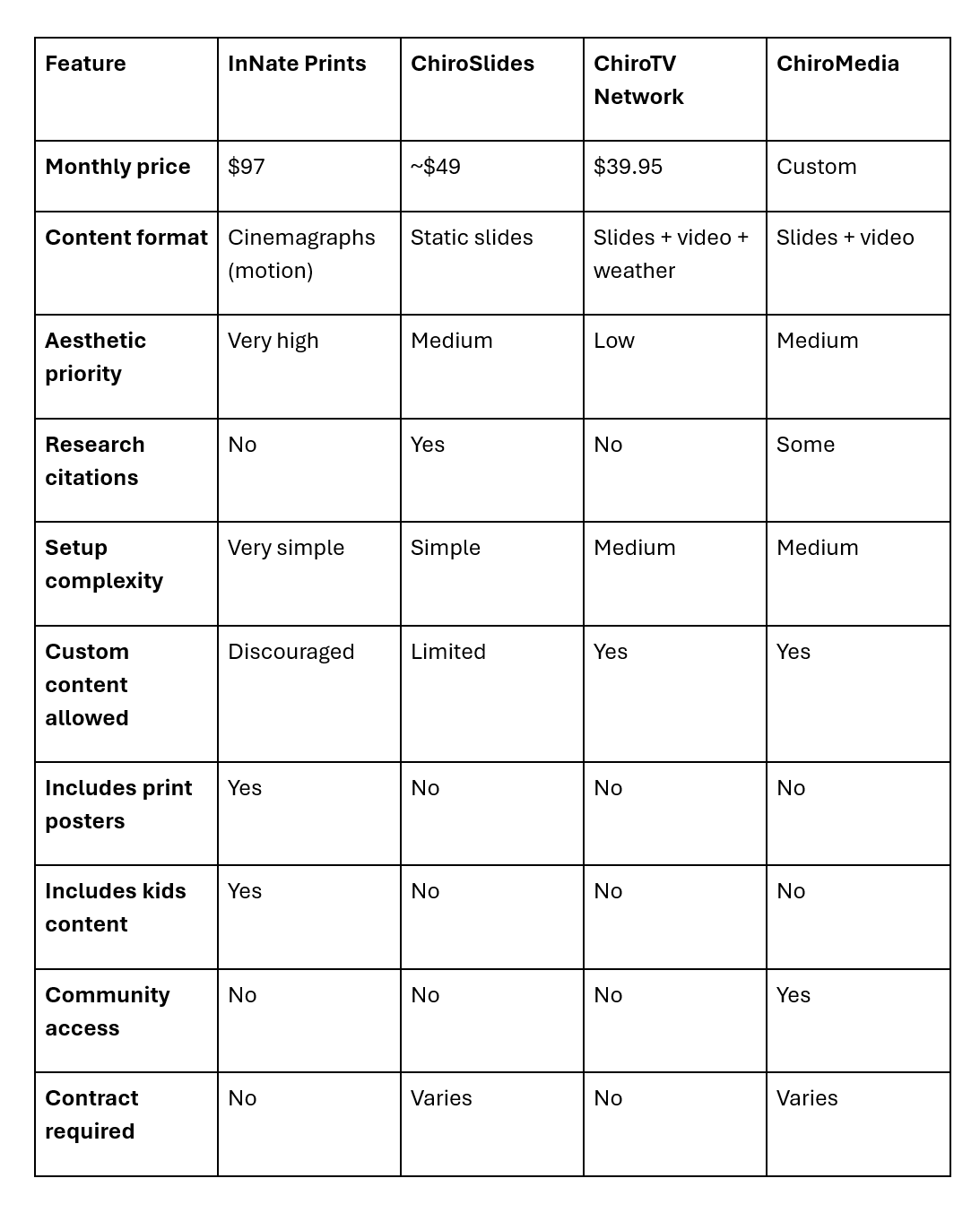
How to make the decision:
Here's the straightforward decision process we’d use if we were starting from zero:
Choose InNate Prints if: Aesthetic matters to your brand. You want the simplest possible setup. You value premium design over breadth of features. You want posters and kids' content included.
Choose ChiroSlides if: You need citations to build trust with skeptical or academic patients. You're budget-conscious and willing to sacrifice visual polish for credibility.
Choose ChiroTV Network if: You want the lowest cost and the broadest feature set. You want to display weather, news, and announcements alongside educational content.
Choose ChiroMedia if: You want the built-in community, and you'll actually use the presenter mode for new patient orientations.
The question nobody asks but should:
Which of these will you still be subscribed to in three years?
This is the question that really matters. Most chiropractic waiting room content subscription services see a high rate of cancellations in the first year. DCs sign up, use it for a few months, lose interest, and then cancel.
The subscriptions that survive long-term are the ones that genuinely remove work from the DC's plate and that the DC feels proud of when patients see them. If the content embarrasses you, you'll cancel. If it requires too much effort to maintain, you'll cancel. If it looks like everyone else's waiting room, you'll start wondering if it's worth the money.
Whatever you choose, ask yourself: in six months, when patients mention your screens, will you feel good about what’s showing? That’s what matters most.
Ready to see what InNate Prints looks like in practice?
If the design-focused option seems right for your clinic, you can check out the full graphics library and start your subscription on our site. It’s $97 a month, with no contracts, and you can cancel anytime.
See our Graphics →
Still deciding? Email us at connect@innateprints.com. We’ll honestly let you know if we’re the right fit or suggest a competitor if they suit you better.